

alternatives#
- class pdcleaner.detection.strings.alternatives(obj, detector=None, keys='fingerprint', keep='mode')[source]#
Bases:
_ObjectTypeSeriesDetectorDetect strings that might be alternative representations of the same thing.
This detection method is typically useful for people names or for brands. It works on a clustering approach by grouping strings that might be alternative representations of the same thing, but written a little bit diferently, e.g: ‘Linus Torvalds’, ‘linus.torvald’, ‘Torvalds, Linus’, ‘linus torvald’
As explained in [1]: "Key Collision methods are based on the idea of creating an alternative representation of a value (a “key”) that contains only the most valuable or meaningful part of the string and “buckets” together different strings based on the fact that their key is the same (hence the name “key collision”).
As for now, the only available method is the fingerprinting method, explained in [1]. In the aforementioned example, all strings would have the same key: ‘linus torvalds’
Depending on the value of the keyword
keep, the detector flags as errors values:that are noy not the most frequent formulation (if
keep=='mode', by default)that are not similar to the first one encountered (
if keep=='first'). This can prove useful when new data with a slightly different formatting are added to a dataset.
A dictionary associating the keys and the valid associated values is produced. {‘linus torvalds’: ‘Linus Torvalds’, …}
Reference#
- param keys:
method for generating the keys. Only ‘fingerprint’ currently available
- type keys:
str (Default = ‘fingerprint’)
- param keep:
which alternative representation shoud be kept ? The most frequent (
mode) or thefirstone?- type keep:
str (Default = ‘mode’)
- raises ValueError:
when
keysis not ‘fingerprint’- raises ValueError:
if
keepis neithermodenorfirst
Note
NA values are not treated as errors.
Examples
>>> series = pd.Series(['Linus Torvalds','linus.torvalds','Torvalds, Linus',
                           'Linus Torvalds', 'Bill Gates', ])
>>> detector = series.cleaner.detect.alternatives()
>>> print(detector.is_error())
0    False
1    True
2    True
3    False
4    False
dtype: bool
>>> print(detector.dict_keys)
{'linus torvalds': 'Linus Torvalds', 'bill gates': 'Bill Gates'}
Missing values are not treated as errors.
>>> series = pd.Series(['Linus Torvalds','linus.torvalds','Torvalds, Linus', np.nan ])
>>> detector = series.cleaner.detect.alternatives()
>>> print(detector.is_error())
0    False
1    True
2    False
3    False
dtype: bool
Attributes Summary
A python dictionary associating the key with keep formulation can be used for replacements
Indices of the rows detected as errors
Returns the value of the keyword keep
returns the name of the method used to generate keys
Number of rows detected as errors
The object (Series or DataFrame) containing the data to which the detection is applied
Methods Summary
calc_keys([method])Calculate keys with the given method
detected()Series or DataFrame containing only the detected errors
fingerprints(series_)Calculate fingerprint key for each element of the series
Returns True if any error has been detected, False otherwise
is_error()Return a boolean same-sized object indicating if the values are flagged as errors
Return a boolean same-sized object indicating if the values are NOT flagged as errors
plot([cmap, not_displayed_color, nfirst, ...])plot a countplot of values frequency grouped by keys, with options to compact the graph
report()prints a detection report
valid()Series or DataFrame containing only the valid values
Attributes Documentation
- dict_keys#
A python dictionary associating the key with keep formulation can be used for replacements
- index#
Indices of the rows detected as errors
- keep#
Returns the value of the keyword keep
- keys#
returns the name of the method used to generate keys
- n_errors#
Number of rows detected as errors
- name = 'alternatives'#
- obj#
The object (Series or DataFrame) containing the data to which the detection is applied
Methods Documentation
- detected()#
Series or DataFrame containing only the detected errors
- static fingerprints(series_: Series) Series[source]#
Calculate fingerprint key for each element of the series
- has_errors() bool#
Returns True if any error has been detected, False otherwise
- is_error() Series#
Return a boolean same-sized object indicating if the values are flagged as errors
- not_error() Series#
Return a boolean same-sized object indicating if the values are NOT flagged as errors
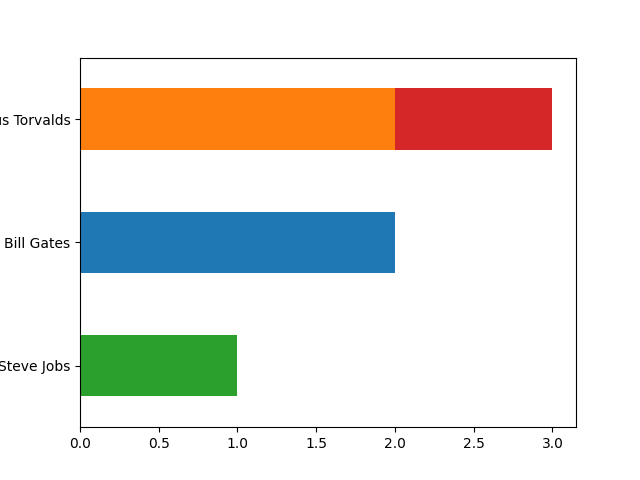
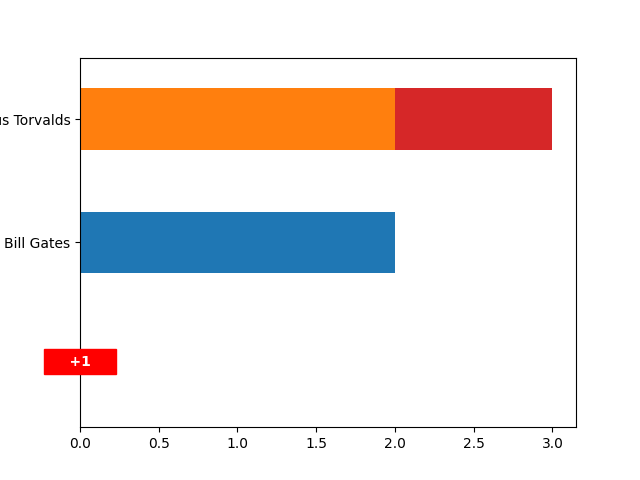
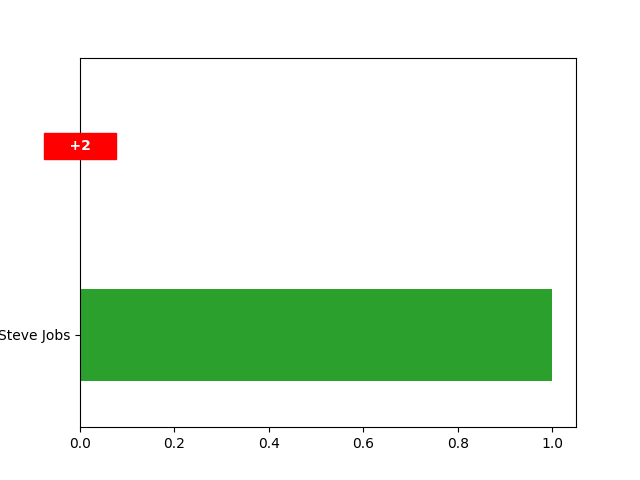
- plot(cmap=None, not_displayed_color='red', nfirst=0, nlast=0, figsize=None)#
plot a countplot of values frequency grouped by keys, with options to compact the graph
- Parameters:
cmap (palette name (Default = Default matplotlib's palette)) – Should be something that can be interpreted by seaborn’s color_palette()
not_displayed_color (str, color name (Default = "red")) – Box color for the number of hidden values
nfirst (int) – Number of top n values to display
nlast (Bool (Default: True)) – Number of n last values to display
figsize ((float, float) (Default: None)) – width and height of the figure.
- Returns:
axs – matplotlib axes objects representing the plots
- Return type:
matplotlib.axes._subplots.AxesSubplot
- Raises:
ValueError if nfirst or nlast is <0 –
TypeError if nfirst or nlast is not an integer –
Examples
>>> series = pd.Series(['Linus Torvalds',
                           'Torvalds, Linus',
                           'Linus Torvalds',
                           'Bill Gates',
                           'Bill Gates',
                           'Steve Jobs',
                           ])
>>> detector = series.cleaner.detect.alternatives()
>>> detector.plot()
Display only the two most frequents
>>> detector.plot(nfirst=2)
Display only the least frequent
>>> detector.plot(nlast=1)
- report()#
prints a detection report
- valid()#
Series or DataFrame containing only the valid values