
Values detectors (freq & counts)#
Plot method for values count and freq detectors
- pdcleaner.plots.freqandcount.plot(self, nfirst=0, nlast=0, figsize=None, color='green', errors_color='red', not_displayed_color='grey')[source]#
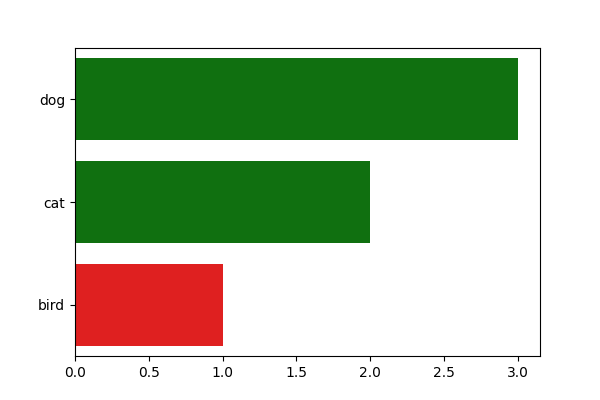
plot a countplot of values frequency, with options to compact the graph
- Parameters:
nfirst (int) – Number of top n values to display
nlast (Bool (Default: True)) – Number of n last values to display
figsize ((float, float) (Default: None)) – width and height of the figure.
color (palette name (Default: "green")) – Color associated to legitimate values. Should be something that can be interpreted by seaborn’s color_palette()
errors_color (palette name (Default: "red")) – Color associated to erroneous values. Should be something that can be interpreted by seaborn’s color_palette()
not_displayed_color (str, color name (Default = "grey")) – Box color for the number of hidden values
- Returns:
axs – matplotlib axes objects representing the plots
- Return type:
matplotlib.axes._subplots.AxesSubplot
- Raises:
ValueError if nfirst or nlast is <0 –
TypeError if nfirst or nlast is not an integer –
Examples
>>> series = pd.Series(['cat','cat','dog', 'dog','dog','bird'])
>>> detector = series.cleaner.detect.freq(freq=.2)
>>> detector.plot()

>>> detector.plot(nfirst=1, nlast=1)